Tuvvy

Company

Your business in your pocket: company details ready to paste, a client book, invoices you can issue and send from the phone, and one number telling you who still owes you money. You choose what the module is called — Company, Firma, Business or your own company name.

9:41▲ ◢ ▮
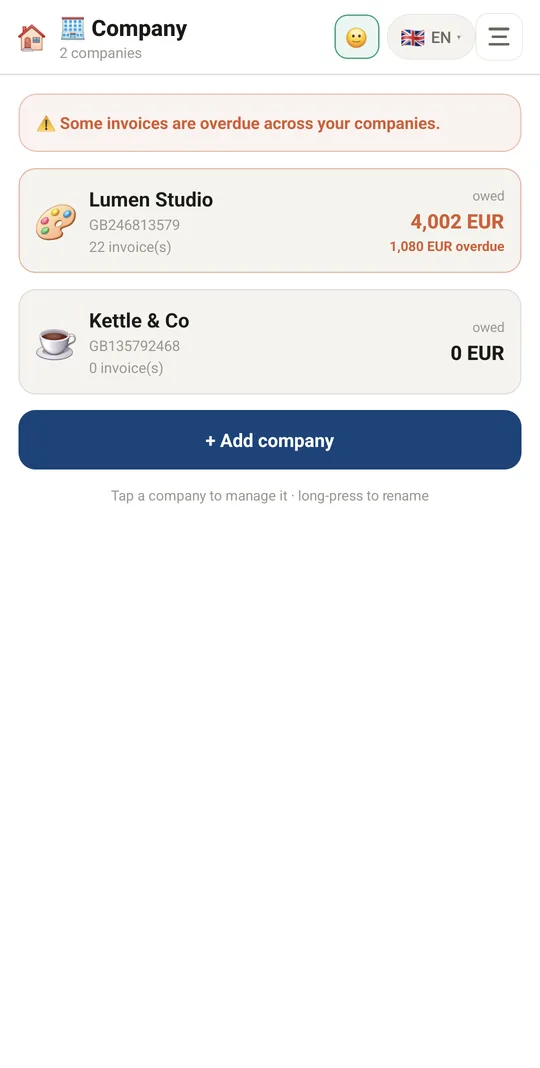
All your businesses in one place
9:41▲ ◢ ▮
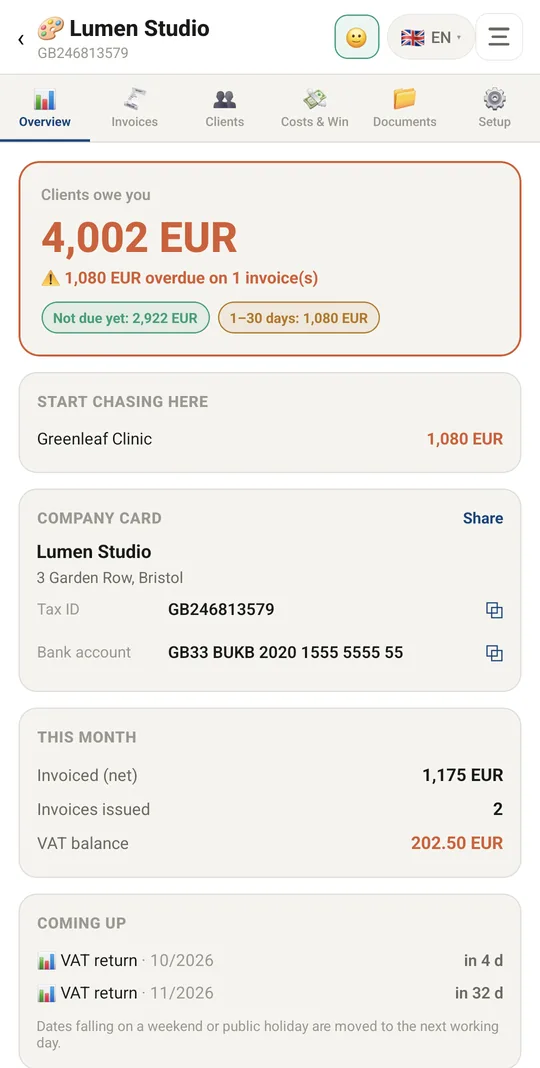
Who owes you and the next tax deadlines
9:41▲ ◢ ▮
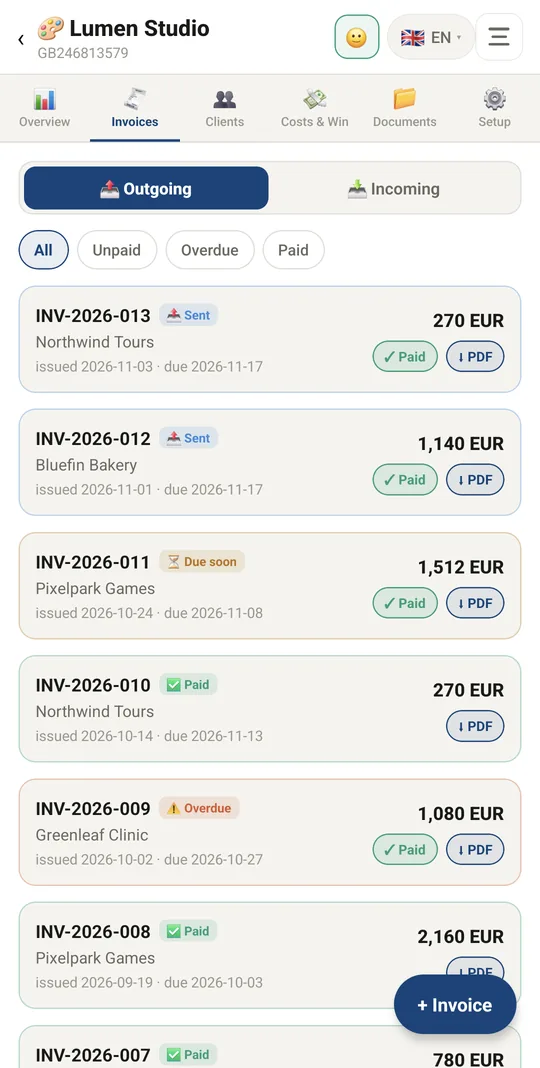
Invoices with their payment status
9:41▲ ◢ ▮
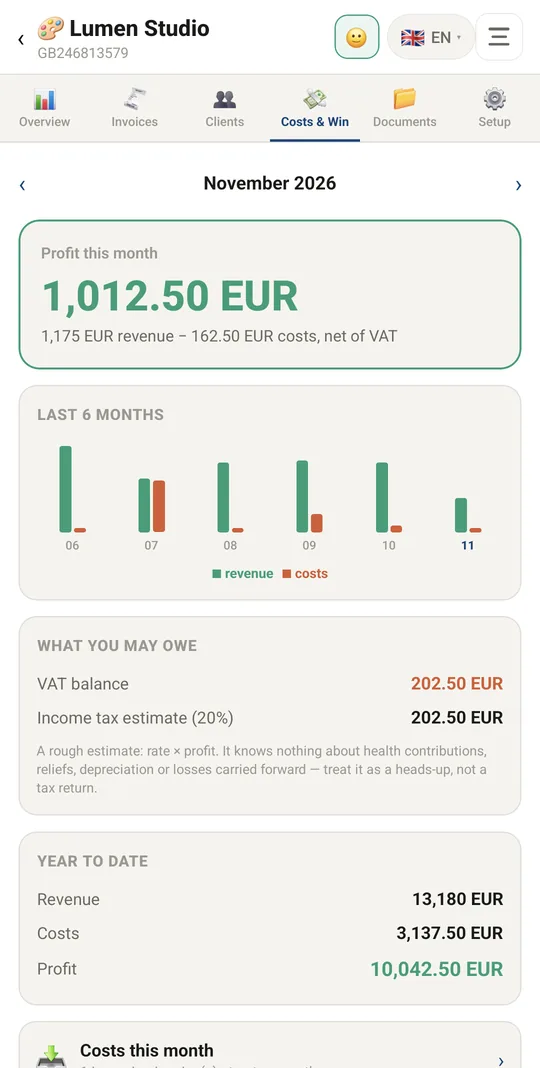
Profit, costs and VAT each month
9:41▲ ◢ ▮
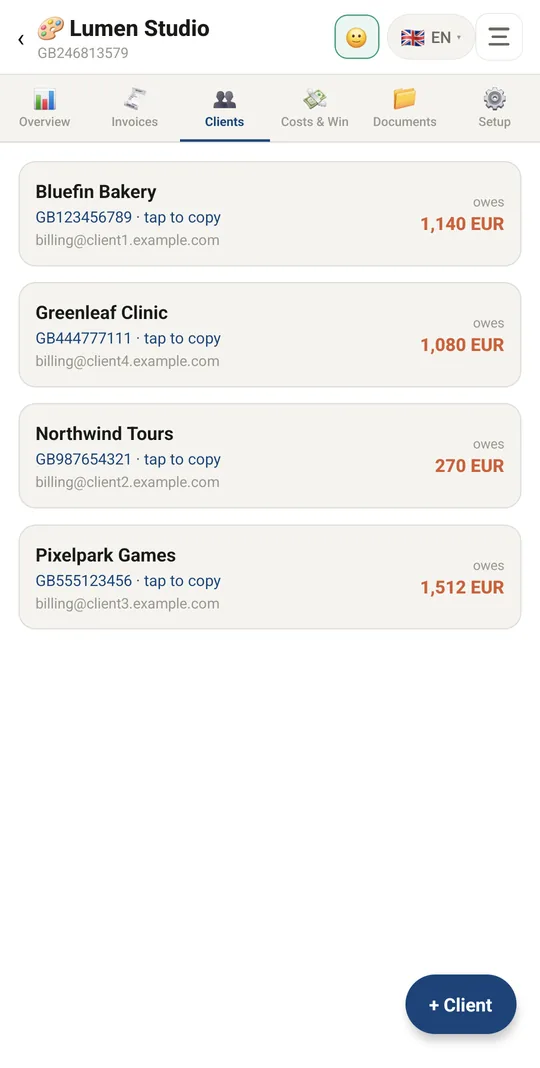
Clients saved once
Clients saved once
9:41▲ ◢ ▮
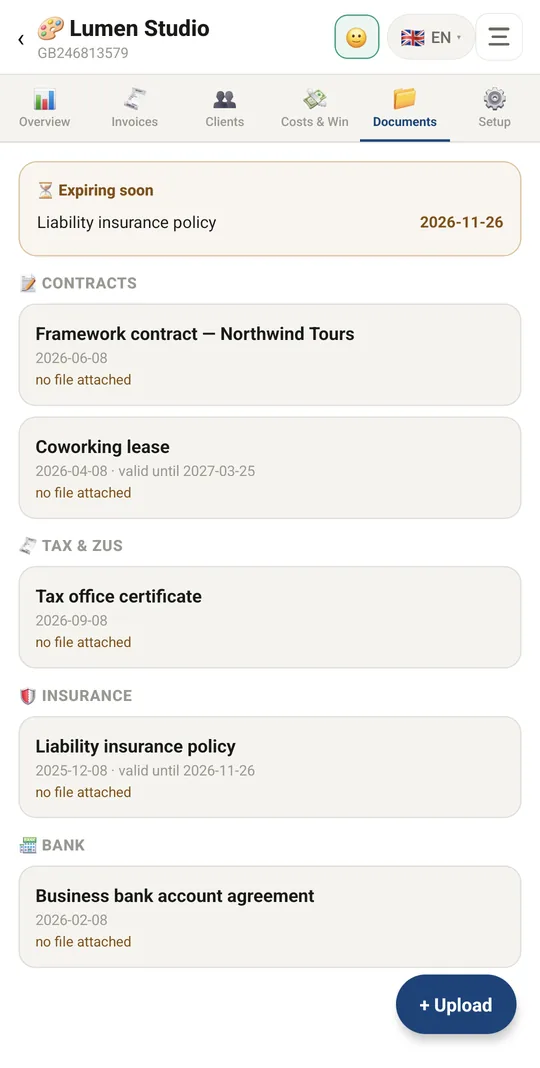
Contracts, policies and permits

Already in the app

68 functions, free in every Tuvvy.

Company list

  • Several companies/businesses in one module — each with its own invoices, clients, numbering and tax settings
  • Add a company with a name and icon (emoji) — once added, you go straight inside it
  • Rename a company and change its icon (long-press the row on the list or “Rename” in Settings)
  • Delete a company (when there is more than one) — invoices stay in the database but are no longer shown
  • Each company on the list shows: tax ID (or “no tax ID”), number of open invoices, amount receivable and amount overdue
  • Warning when any company has overdue invoices
  • Custom module name (e.g. “Company”, “Business”) shown in the header and on the home screen tile

Company dashboard

  • One big number: how much clients owe you, with the amount and number of overdue invoices
  • “Start collecting here” list — the most urgent unpaid invoices, with a jump to the unpaid list
  • Company business card: name, tax ID, IBAN etc. — every field copied with one tap
  • Share company details as text (Share button)
  • Monthly summary: net invoiced, number of invoices issued, VAT balance
  • How much you still owe (unpaid cost invoices)
  • “Upcoming” deadlines: ZUS, PIT advance, VAT/JPK_V7 — with days remaining
  • Deadlines falling on a weekend or holiday moved to the next business day (Polish holiday calendar)
  • Quick “New invoice” button and a shortcut to Settings when company details are missing

Invoices

  • Two sub-tabs: Issued (sales) and Received (costs)
  • Filters: All / Unpaid / Overdue / Paid
  • Statuses calculated automatically: draft, sent, due soon, partially paid, overdue, paid, cancelled
  • Mark as paid with one tap (✓ Paid) from the list
  • Export a sales invoice to PDF with one tap (⬇ PDF); without expo-print — a printable HTML file
  • Open a cost invoice attachment from the list (⬇ Open)
  • Delete an invoice by long-pressing the row or from the form
  • Amount still due on partially paid invoices

Invoice form

  • Pick the buyer from saved clients or enter manually (name, tax ID, address)
  • Tax ID (NIP) checksum validation with a typo warning
  • Save the buyer to clients right from the invoice (“Save to my clients”)
  • Automatic next invoice number based on the numbering pattern
  • Dates: issue, sale/delivery, payment due (calculated from payment days)
  • Line items: name, quantity, unit, net price, VAT rate (23/8/5/0/zw/np/oo in PL mode), gross line value
  • Add multiple line items; summary of net, VAT broken down by rate, gross
  • Payment: payment method, amount already paid, notes on the invoice
  • Attachments: pick a file or photo (PDF/scan of a cost invoice, signed copy, delivery note)
  • Preview attached files in the app (photos) and “Open in another app”/Share
  • Choose the design template and document language for a single invoice
  • “Save and send” — export and share the invoice as a file
  • “Export as PDF” from the form
  • Amount in words on the invoice

Clients

  • Client list with how much each one owes
  • Copy a client's tax ID/details with one tap
  • Client: name, tax ID (validated), address, email, phone, own payment term, notes
  • Edit and delete a client (long-press the row or in the form)
  • Client details go onto every invoice automatically

Costs and profit

  • Switch months with arrows
  • Monthly profit or loss calculated net (revenue − costs excluding VAT)
  • Chart of the last 6 months: revenue vs costs
  • “What you may owe”: VAT balance (for VAT payers) and an income tax estimate at your rate
  • Year-to-date summary: revenue, costs, profit
  • Shortcut to the month's cost invoices

Company documents

  • A cabinet for papers that aren't invoices: contracts, taxes and ZUS, insurance, licences, bank, HR, other
  • Document: name, category, date, “valid until” (optional), notes, multiple files (PDF/photo)
  • “Expiring soon” section — documents that expire within 30 days
  • Documents grouped by category
  • Open/preview a document file, edit and delete (long-press)

Company settings

  • Company details: name on invoice, address, NIP/VAT ID, REGON, IBAN (validated), bank, email, phone, website
  • Copy company details as a contact card (vCard)
  • Tax mode: Poland (NIP, REGON, VAT rates, ZUS/VAT deadlines) or General
  • Toggles: active VAT payer, I pay ZUS, I pay PIT advances
  • Currency: PLN, EUR, USD, GBP, CHF
  • Numbering pattern with tokens {NR}, {NR:3}, {DD}, {MM}, {YYYY}, {YY}
  • Numbering reset: yearly, monthly, never
  • Default payment term (days)
  • Income tax rate (%) for the estimate in the Costs and profit tab
  • Invoice language independent of the app language (PL, EN, DE)
  • 10 invoice design templates: Classic, Modern, Minimal, Bold, Corporate, Elegant, Compact, Receipt, Developer, Gradient

Integrations

  • Invoice due dates and tax deadlines shown as an overlay in the Calendar module
  • Tuvvy account picker (account switcher) — data per account
  • 💬 Invoice from a Talk chat: ⚙️ → Issue an invoice fills in the client and the last amount from the chat; the PDF with amount, due date, bank account, transfer title and your payment link goes back to the same chat, and ✓ Paid offers a paid message there

With Tuvvy Premium Premium

Extras that tie this module to the rest of your Tuvvy.

⭐ Premium

Slack/Teams/Discord team channel

when a sales invoice is marked as paid, Tuvvy posts a message to the channel

Coming next

Ideas we are working on or considering — tell us which one you want first.

Idea · Premium

Quote, approval, invoice

Send a quote, the client signs it with DokSign, and the advance and final invoices are made from the same items.

Idea

Costs from a photo

Take a photo of a supplier invoice and it is read and added to your costs.

Idea

Polite payment reminders

Clients get friendly reminders 1, 7 and 14 days after the due date, by email or in Talk.

Idea

Pack for your accountant

One button zips the month's sales and cost invoices and sends them to your accountant by email.

Idea

Cash gap forecast

Unpaid invoices, each client's payment habits and fixed costs from Renewals show when money could run short.