Tuvvy

Family

Run a shared home, a family or a student flatshare in one place: today’s family plan, people with live location and place alerts, shared costs with one-tap pay-backs, chores with points, school and pickups — in five tabs: Today, People, Money, Home and Kids.

9:41▲ ◢ ▮
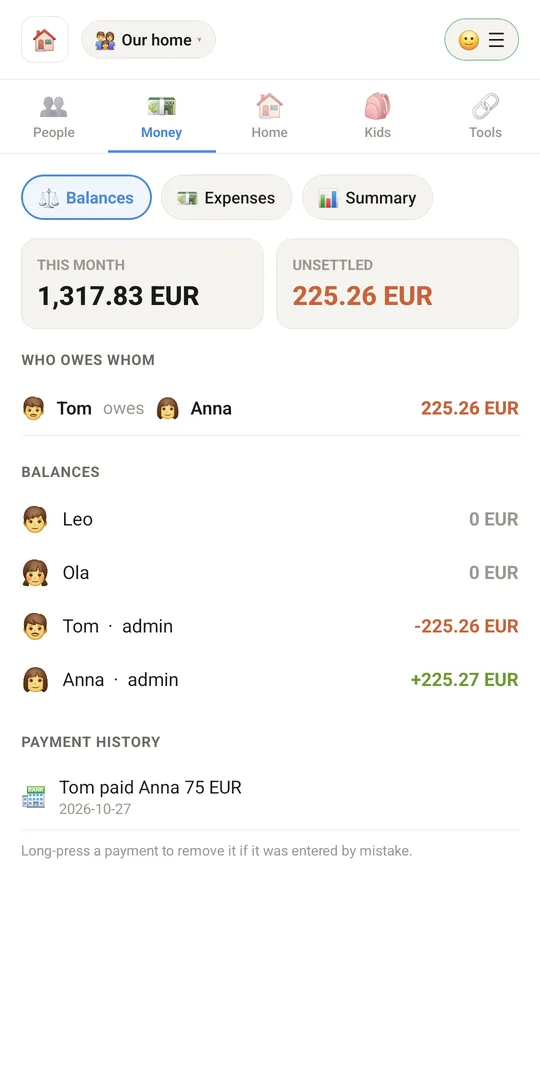
Who owes whom
Who owes whom
9:41▲ ◢ ▮
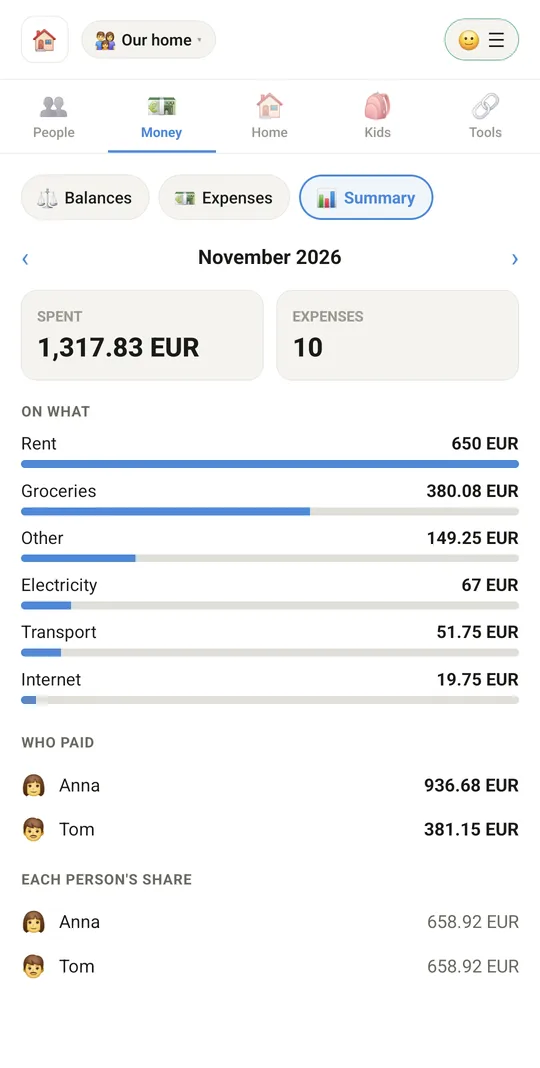
Where the money went this month
9:41▲ ◢ ▮
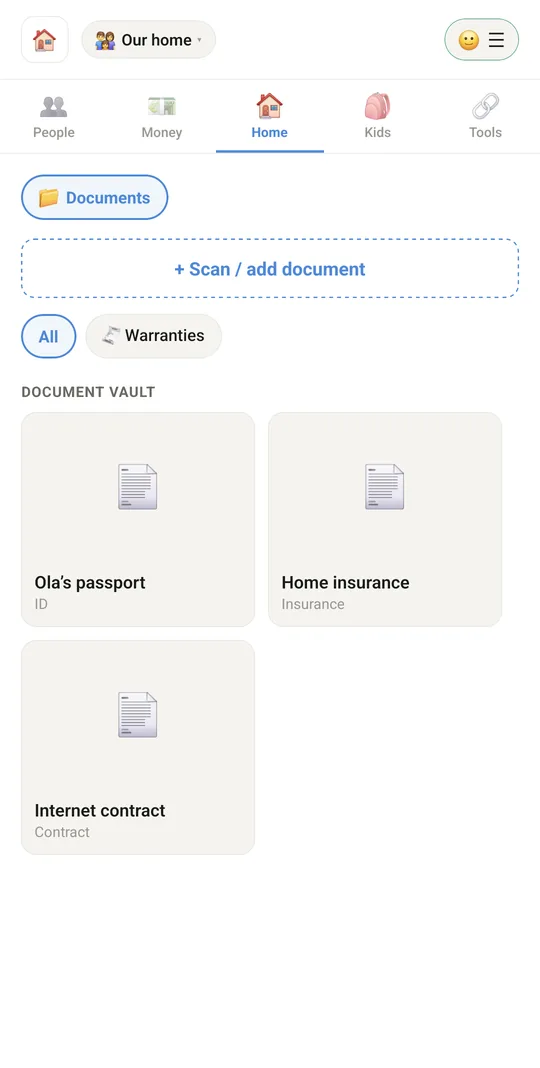
Family documents in one vault
9:41▲ ◢ ▮
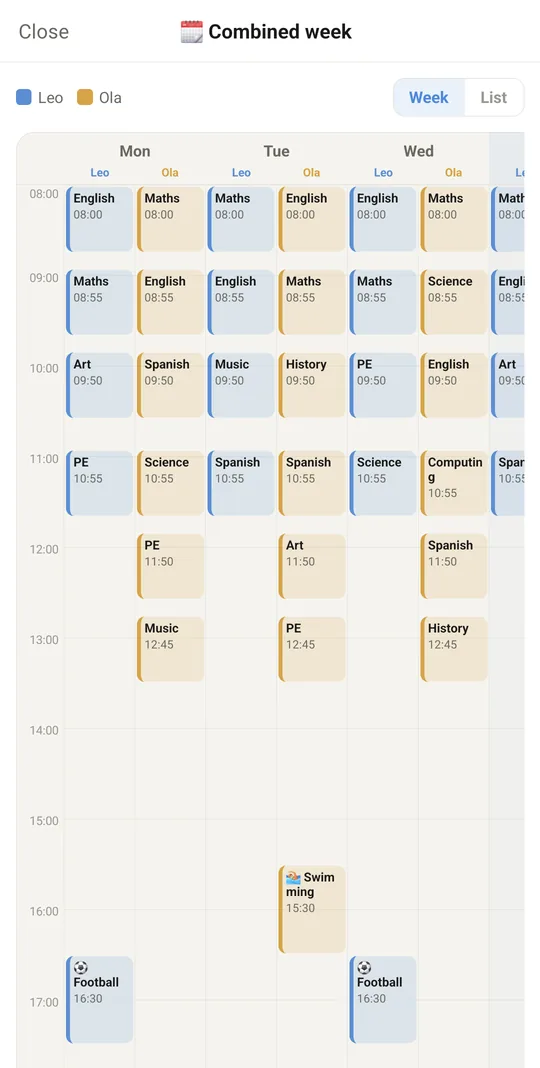
Every child's week in one view

Already in the app

174 functions, free in every Tuvvy.

Groups and module name

  • Create a group: household, home, family or student flatshare
  • Group name and default currency (16 currencies to choose from)
  • Several groups on one account, switched from the chip in the header
  • Rename a group in place (in an online family the change reaches everyone)
  • Delete a group from the phone along with its people, expenses and documents
  • Group label: “Online family” or “Only on this phone”
  • Choose the module name: Family, Household, My home, Community, Flat, Neighbourhood (also labels the home-screen tile)
  • ☰ menu: module name, Tuvvy Premium (in the Health and Family apps), Tuvvy accounts, help, language
  • Five tabs: Today, People, Money, Home, Kids
  • Open the right group and tab from a link or notification

Online family and invites

  • Turn a phone-only group into an online family on the first invite
  • Family data encrypted with the family key before it leaves the phone
  • Syncs with the family in the background and every 20 s while the screen is open
  • Invite a Tuvvy account by @handle or from Messenger contacts
  • Choose the invitee’s role: adult or admin
  • Invite tied to a person’s entry (the person takes over their entry)
  • Invite link and QR code: single-use for one person or general for 5 people, valid 3 days
  • Share the invite link and turn off active links
  • Join a family from a link or QR code with an invite preview
  • Invite banner: join or decline
  • Manage a person’s access: make admin, change to adult, remove from family, cancel invite
  • Leave the family keeping a copy as a regular group, or without a copy
  • Approve a family member’s new phone
  • Create a new family key after a phone is lost
  • Keep data on the phone when the family has vanished from the server
  • Family status: role, encryption, offline mode with later sync
  • Admin / adult / child roles — a child doesn’t see money or documents and edits only their own entry

Today in the family

  • Shared day and week plan (premium)
  • Day / Week view with scrolling and jump back to today (premium)
  • In the agenda: lessons, activities, pickups, doctor visits, car bookings, payment due dates, birthdays, chores, dinner, expiring documents (premium)
  • A colour for each person in the agenda (premium)
  • Kids strip: activities and who picks up today (premium)
  • “Picked up ✅” — notify the family with one tap (premium)
  • Ask for pickup cover (“I can’t — who can take over?”) (premium)
  • Take over a pickup with one tap or cancel the request (premium)
  • Export the agenda to .ics (Google / Android / Apple) without duplicates on re-export (premium)

People

  • Add and edit people: name, avatar, phone, email, chores
  • Import a person from phone contacts with search
  • Mark a person as a child, with class / age
  • Person’s colour in the “Today” agenda
  • Person’s bank account (IBAN, BIC) for pay-backs, with number validation
  • Link a person to a Healthy profile (allergies, medicines, visits)
  • Quick actions: call, message (SMS or Tuvvy Messenger), email
  • Tuvvy account badge on a person: account, invite sent, no account
  • Remove a person from the group
  • 🪪 People as big cards: everyone as a round avatar in their colour, and a card for the chosen person with call, message and location (Cards / List switch)
  • 🟢 Online dot on family members with an account and "online 3 h ago" under the name; an invite not accepted yet shows an empty ring

Location and safety

  • Send your location once
  • Live location for 1 hour, 8 hours or until turned off (encrypted)
  • Family member’s position with “x min ago”, battery and steps (iPhone)
  • Stop sharing location
  • In-app family map with everyone sharing and all places
  • Route of a chosen person from today or yesterday (kept 7 days)
  • Open a position in an external maps app
  • “Ring loudly” — alarm on another person’s phone, even when silenced on Android
  • Low-battery alert for a family member (≤15%)
  • Family places (Home, School, Work…) with radius and map (premium)
  • Add a place from current position, coordinates or a map link (premium)
  • Arrival and departure alerts for places, turned on by each person on their own phone (premium)
  • “Place alerts on” badge on a person (premium)
  • “I’m safe” — position and battery to the family with one tap (premium)
  • SOS to all online families with location, cannot be muted (premium)
  • List of recent safety events (premium)
  • 🚶 Walk me home (SOS): during the walk your family sees you live on the map, gets an SOS with your position on an alarm and “I’m safe” on arrival

Money

  • Balances: spending this month and total unsettled
  • “Who owes whom” with the fewest transfers
  • Each person’s balance
  • “Pay back” with a bank QR code (ZBP for złoty, EPC/SEPA for euro) (premium)
  • Change the pay-back amount, share transfer details, mark “paid by transfer” or “in cash” (premium)
  • Pay-back history visible to the whole family, undo with a long press
  • Expense list with marking as settled
  • Cost trend chart: monthly and cumulative, total and average
  • Monthly budgets per category with a warning from 80% and when exceeded (premium)
  • Monthly summary with month switching: spent, number of expenses, on what, who paid, how much each person

Expenses

  • Add and edit an expense: title, amount, date, currency, who paid, category
  • Split equally or by shares between chosen people
  • Scan a receipt with the camera — the photo always goes to documents
  • Receipt reading on the Tuvvy server (OCR): shop as title, amount, date, currency and line items with prices added to the comment (premium)
  • When a receipt can’t be read (no premium, daily limit, no network) — only the photo stays, with a message to enter the amount by hand
  • Multiple documents and photos per expense (camera or gallery) with document history
  • Price history with a min / max chart
  • Payment reminder at 9:00 on the due date, on the phones of the people the expense concerns
  • Recurring payment: one-off, monthly, quarterly, yearly
  • Payee details: name, phone, email, address, IBAN, BIC, bank, transfer title
  • “Pay with bank QR code” for an expense with a payee account
  • Expense comment
  • “Save as warranty” — creates a warranty document from the expense
  • Delete an expense

Chores and rewards

  • Household chores with points (premium)
  • Repeat: on chosen weekdays, every N days or on a day of the month (premium)
  • Person rotation queue (premium)
  • Pocket-money bonus for a chore (premium)
  • Adult approval of a child’s check-off (premium)
  • Pause a chore (premium)
  • Lists for today, awaiting approval and later this week (premium)
  • Adult checks off for someone — approved straight away (premium)
  • Rewards for points, child requests a reward, adult grants or declines (premium)
  • Weekly points leaderboard (premium)

Dinners, board, memories

  • Weekly dinner planner with week switching (premium)
  • Dinner from a recipe in the Recipes module (search) or your own description with ingredients (premium)
  • “Add this week” — ingredients to a shared shopping list in Todo or to Shopping List, without duplicates (premium)
  • Family board: notes and announcements (premium)
  • Pinned notes hidden until tapped (e.g. gate code, Wi-Fi) (premium)
  • A dated note disappears a day later (premium)
  • Polls with multiple answers and a vote from each member (premium)
  • Delete a board post with a long press (premium)
  • Memories: title, date, album, photos, who was there, note (premium)
  • Memories timeline by year and album, full-screen photo view (premium)
  • Memory photos encrypted with the family key (premium)

Documents

  • Document vault: contracts, bills, insurance, receipts, IDs, warranties
  • Scan / photo of a document, multiple photos with tags (receipt, warranty card, rating plate, insurance, loan, lease)
  • Category, whose document it is, notes
  • Filter: all / warranties
  • Warranty: purchase date, period, shop, model, serial number
  • Document expiry date with a reminder N days before (premium)
  • Expiring documents section with day count (premium)
  • Documents from expenses grouped by category

Tools and connections

  • Family chat in Messenger (group with family members)
  • Shared shopping list in Todo
  • Shared moving checklist in Todo
  • Shared trip in Travel
  • Family games — invite the whole family
  • Book a vehicle from Fleet for a person on a chosen day
  • Share a vehicle on Sharey
  • Upcoming visits from Healthy
  • Doodle scheduling polls and Clipboard shared with the online family

Kids

  • Child’s school: name, address, email, phone, class teacher and after-school teacher with phone numbers
  • School year from–to and school-day hours
  • Weekly timetable with clock-picked times and an automatic end after 45 min
  • Extra activities with an icon (chosen or suggested from the name)
  • Edit and delete lessons and activities
  • Who picks up each day: family, friends from Friends Book, contacts, with search
  • Set the pickup person for the whole week and a “call” button
  • Week overview in columns
  • Shared week for several kids: grid or list
  • Add the coming week to Tuvvy Calendar
  • Export the timetable to .ics
  • School reminders (start of year, before lessons, end / pickup) and clearing them
  • Export and import the school timetable
  • Classmates with names and photos, plus a class photo
  • Reminder at 19:00 the day before for the pickup person
  • Learning: turn on kids’ courses (maths, coding, English, science) and view progress
  • Pocket money: weekly allowance with payday and pause (premium)
  • Pocket money: payout, bonus, correction, history (premium)
  • Savings goals: save, undo, “bought” (premium)
  • Child’s balance with chore bonuses (premium)
  • Babysitter card: allergies, medicines, bedtime, rules, who picks up, notes, phone numbers (premium)
  • Card with allergies and medicines pulled from Healthy (premium)
  • Card valid for a set number of hours, as a QR code or shared text (premium)
  • Door code and a comment in the child’s school details
  • 🎁 Gift ideas for each child, matched to their age — tick off what was already given or does not suit them, and add your own. Children do not see the list

Senior care

  • Senior care in the online family — settings and caregiver card in Healthy (☰ menu → Senior care) (premium)
  • Push to the family’s adults and admins about an unconfirmed dose or a missing “I’m OK” (premium)
  • An adult or admin turns on care for a family member; the senior gets a notification and can turn it off (premium)
  • Senior’s day overview (doses, “I’m OK”, last sign of activity) and “Ring loudly” to them (premium)
  • Senior care works with any subscription (Health, Family or Tuvvy Plus) (premium)
  • 🟢 Carers see when the senior was last online: a dot and "online 3 h ago" next to each person they look after

Notifications and settings

  • Notifications about family events (expenses, pay-backs, arrivals, pickups, chores…)
  • Mute categories on this phone only: arrivals and departures, money, kids and pickups, home
  • SOS always gets through and can’t be muted
  • Reminders about expiring documents (premium)
  • Full backup of the module’s data
  • 🎒 Only the tabs you need: no kids at home? Hide the Kids tab in Settings — nothing is deleted

Tuvvy Premium

  • “⭐ Tuvvy Premium” window from the ☰ menu (only in the Tuvvy Health and Tuvvy Family apps)
  • Benefits list: Today in the family, places with alerts, chores, pocket money and dinners, documents with reminders, album, senior care
  • Google Play subscriptions: Family Premium or Tuvvy Plus (Health + Family), monthly or yearly
  • Prices straight from the Play Store, in your country’s currency and with taxes
  • Purchase in the Google Play sheet, confirmed by the Tuvvy server; an unconfirmed purchase completes itself later
  • One adult’s subscription covers the whole Tuvvy family (“Premium shared by your family”)
  • Subscription status: active and renews on…, active until… without renewal, team account has everything unlocked
  • “Restore purchases” from your Google account
  • “Manage subscription” — cancel and change plan in Google Play
  • On iPhone, a note that subscriptions are available in the Android app
  • Premium features without a subscription are hidden, and data saved in them stays untouched; the last known premium status also works offline

With Tuvvy Premium Premium

Extras that tie this module to the rest of your Tuvvy.

⭐ Premium

🅱️ Plan B for the day

someone sick or away, or the car in the workshop — one tap hands pickups and chores to whoever has the least to do, moves car bookings, adds the doctor visit to Healthy and tells the family; undo puts the usual plan back

⭐ Premium

Fair chore draw instead of turns

whoever did it recently gets a smaller chance, the same pick on every phone

⭐ Premium

Fair draw instead of turns

in a chore with two or more people it falls on whoever has waited longest

⭐ Premium

Points for lessons

a parent sets how many chore points and how much pocket money a child’s finished lesson gives, and Today in the family shows who learned what

⭐ Premium

Dinners drawn by themselves

one tap fills the empty days of the week with recipes, and the shopping list leaves out what is in the Pantry

⭐ Premium

🛂 Home passport

boiler, chimney and gas inspections and filters with reminders for the whole family, meter readings with a photo and usage per day and per year, appliances from warranties with where the manual lies (saved in Stash); “Done” with a cost goes to expenses

Coming next

Ideas we are working on or considering — tell us which one you want first.

Idea · Premium

Baby log

Feeds, nappies and sleep logged live by both parents in one shared log, with a dimmed night mode.

Idea

Shared parenting

For separated parents: a schedule of days with the child and shared child costs, kept factual.

Idea · Premium

Babysitter hours

Who comes on which afternoons, hours worked, what is owed and a history of payments.

Idea

Packing for each child

A separate trip packing list for every child, linked to your trip in Travel.

Idea · Premium

Search family documents

Type what you need, like a policy number, and find it inside your scanned family documents.