Tuvvy

Messenger

Chats and calls between Tuvvy accounts — one-to-one or in groups, Standard or end-to-end encrypted Private.

9:41▲ ◢ ▮
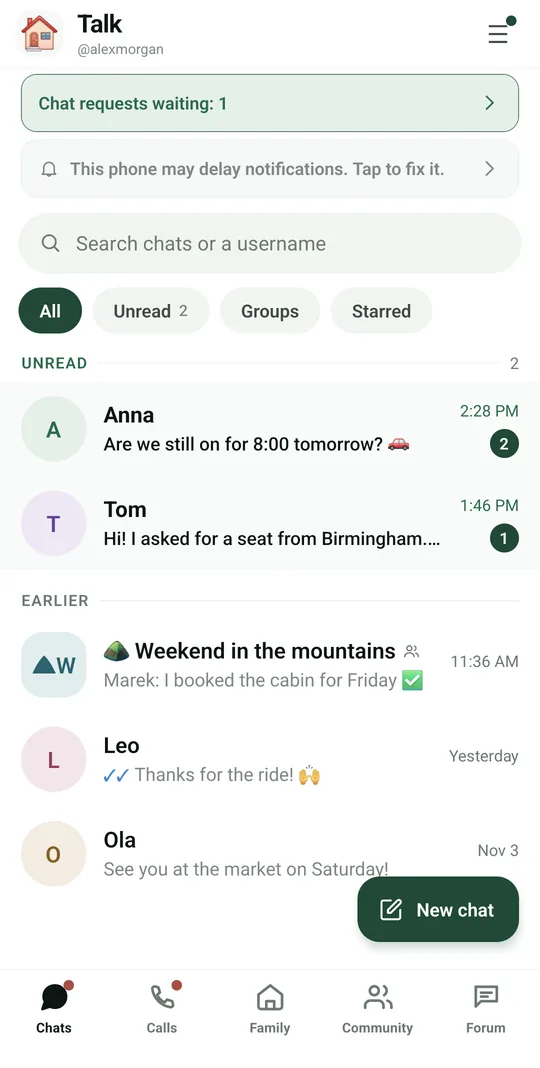
All your chats in one place
9:41▲ ◢ ▮
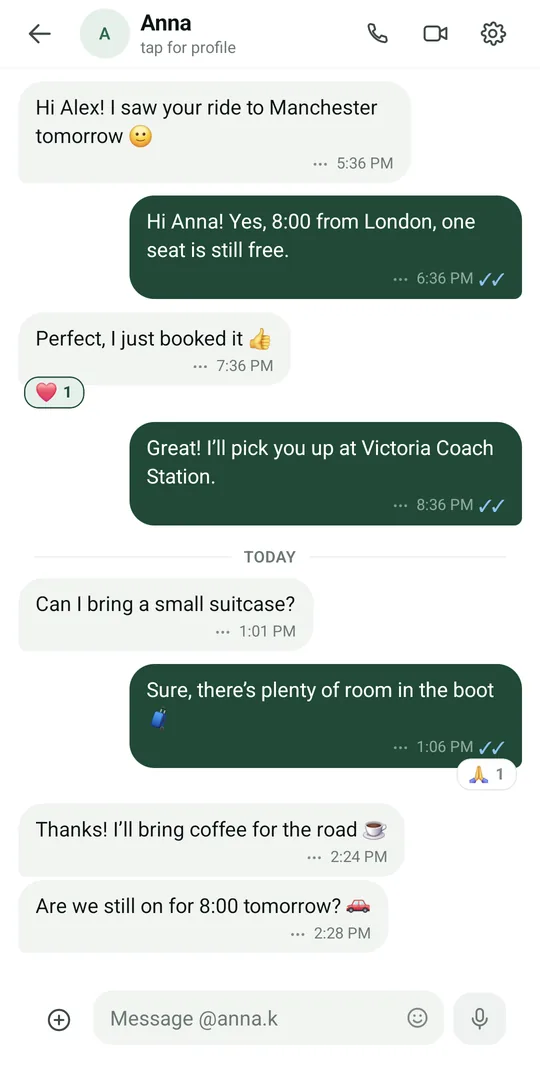
Reactions and read receipts
9:41▲ ◢ ▮
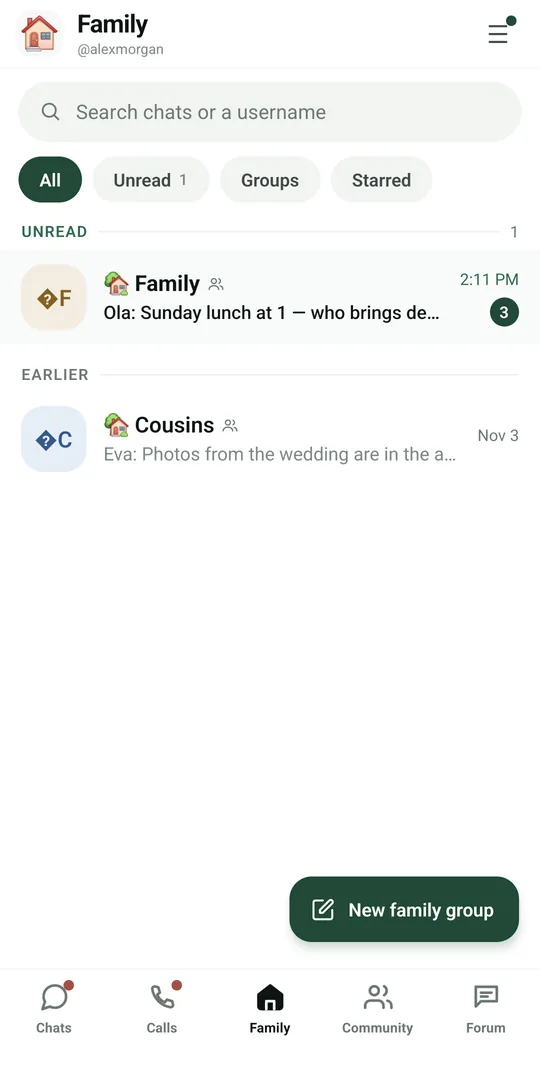
Family groups in their own tab
9:41▲ ◢ ▮
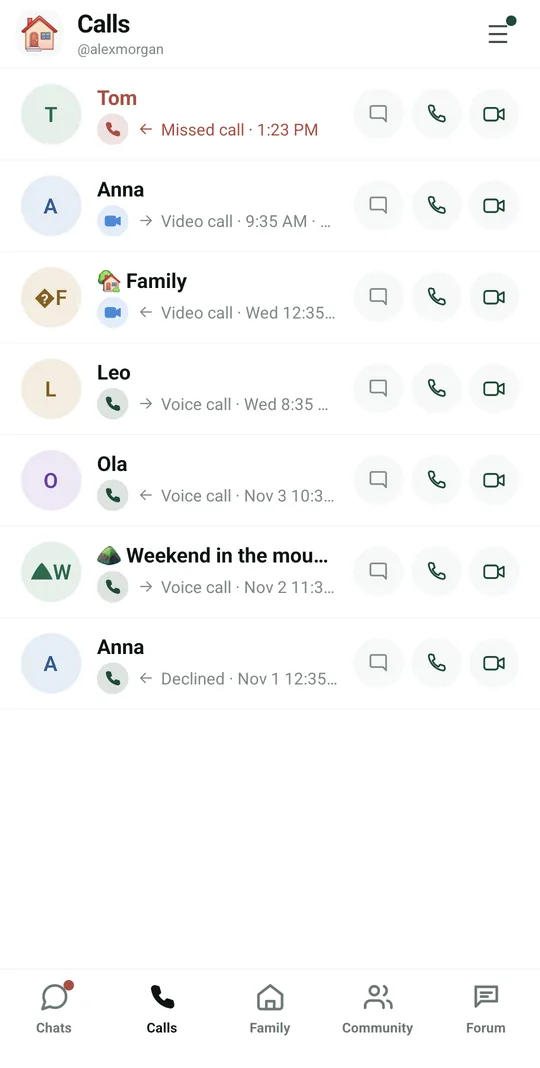
Your call history
Your call history
9:41▲ ◢ ▮
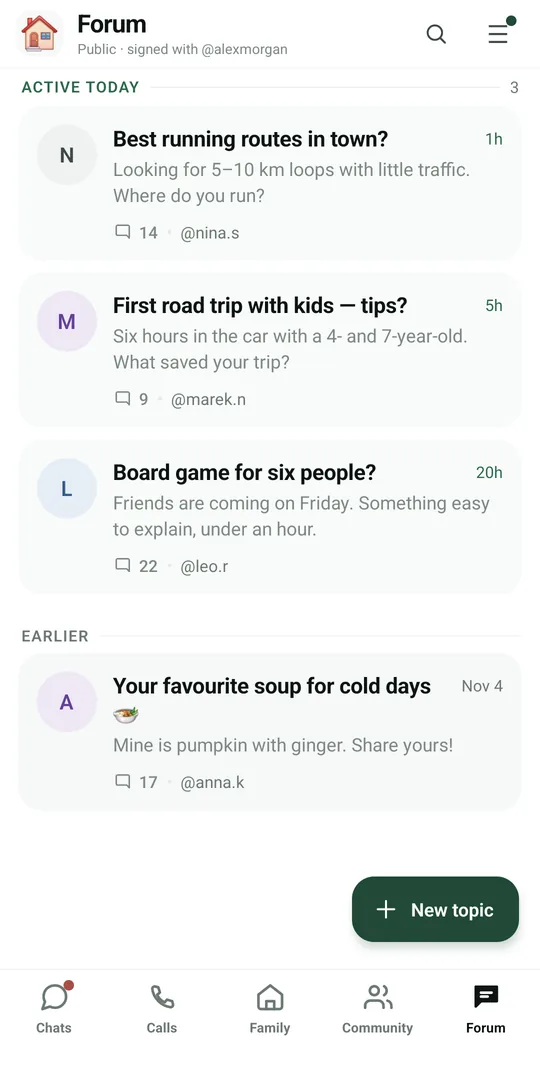
A public forum for everyone

Already in the app

195 functions, free in every Tuvvy.

Chat list

  • Tabs: Chats, Family, Community, Forum and Calls
  • List filters: All, Unread (with count), Groups, Starred
  • List sections: Pinned, Unread, Earlier
  • Search chats and people by username from one field
  • Pin a chat to the top of the list (latest pin on top)
  • Star a chat
  • Mute and unmute chat notifications from the list
  • Archive a chat (it returns to the list on a new message)
  • Archived chats list with restore
  • Swipe a chat row to reveal actions: pin, mute, archive
  • Long-press a chat to open a menu: pin, star, mute, archive
  • @ badge on a chat where someone mentioned you, until read
  • Unread message and missed call counter
  • Ongoing group call bar with the option to join
  • Green + button to start a new chat
  • ☰ menu: You (settings), Help, Language
  • 📁 Chat folders: your own tabs such as Work or School next to the filters — a chat can sit in several folders
  • 🔎 Search messages across all chats: words from the messages saved on the phone, a tap opens the chat at that message
  • 🟢 Online dot on 1:1 chats — green online now, yellow in the last day, grey a while ago — and the chat header says when the person was last online

Finding people and invites

  • Find a person by exact username (@handle)
  • Choose the new chat type: Standard or Private (E2E encrypted)
  • Your own username: copy, share and QR code
  • Scan another person's QR code to open their profile
  • One-time private chat invite (QR valid for 5 minutes, shareable link)
  • Enter a manual invite code (XXXX-XXXX-XXXX-XXXX) with a preview before using it
  • Send a Tuvvy Messenger invite through any app
  • Chat requests from new people: accept, decline or block
  • Choose a username on first launch
  • Open Messenger from other modules on a person or with a ready message draft
  • 📤 Invite friends to Tuvvy Talk from a phone contact, by SMS, by email or through any app — the invite links to your profile

Writing and messages

  • Text messages with link previews
  • Quote reply (swipe a message left or use the menu)
  • Tap a quote to jump to the quoted message
  • Threads under any message with an “N replies” chip
  • @-mention group members with suggestions
  • Edit a sent message
  • Delete a message for everyone
  • Forward messages to one or more chats
  • Copy message text
  • Emoji reactions to messages (quick bar and full set)
  • Star messages and starred list (per chat and across all)
  • Pin a message at the top of the chat, shared with all participants
  • Up to 5 pinned messages in one chat: tap the bar to go through them, ⋯ lists them all
  • Emoji picker (categories: recent, smileys, gestures, hearts, symbols) with draft preview
  • GIF search and sending (KLIPY)
  • “Forwarded” label on forwarded messages
  • Offline send queue — the message goes out once you're back online
  • Retry or discard an unsent message
  • Load older messages and jump-to-latest button
  • Message grouping and day separators (Today, Yesterday)
  • Delivery and read receipts
  • Movie/TV show link (IMDb, TMDB, Letterboxd, Filmweb) → “Add to Your Library”
  • Map link (Google, Apple, OSM, Waze and more) → “Open in Google Maps”
  • Message priority: mark a message Urgent, High, Medium or Low — a coloured stripe on the bubble, a Messages by priority list with filter chips in chat settings and in You; only you see it
  • Your forums: newer phpBB forums such as Gentoo, Debianforum and Genealodzy.pl now work, with threads, following and replies
  • ✍️ Text formatting: *bold*, _italic_, ~strikethrough~, `code` and lists that start with a dash
  • 🛒 Message to shopping list: hold it → Add → pick one of your lists or a new one; each line, or each unticked item of a chat list, becomes an item
  • YouTube links play right in the chat: a thumbnail with ▶, then a small floating window over the chat — drag it to a corner, go full screen or close it, and keep writing

Attachments and interactive content

  • Photos and videos from the gallery (several at once, albums of up to 10 photos)
  • Photo from the camera
  • Record a video with the camera, compressed before sending
  • Documents and files (up to 50 MB, up to 25 MB in encrypted chats)
  • Voice notes: hold to record, slide up to lock, cancel
  • Play voice notes in the bubble
  • Share your current location
  • Share a contact card from the phonebook
  • To-do list in chat — everyone can tick, add and edit items
  • Shopping list in chat — tick, add and edit items
  • Date poll (Doodle) in chat — vote and add your own dates
  • Games in chat: chess, tic-tac-toe, 2048
  • Tuvvy Games invites with a “Join game” button
  • Share a Wallet card in chat and revoke sharing
  • Live route card from the Wall (LIVE) with a jump to the preview
  • Wall link with a “Request to follow” button
  • Upload progress bar with cancel and retry
  • Photo viewer: swipe, download, share, star, reply to a photo
  • Video player with preview frame and duration
  • Open/download an attached file
  • Share to a chat from other apps (text and files)
  • Send content from other modules to a chat (lists, polls, cards, entries)
  • Select photos in Media, links and docs (or 🧩 Make a collage on a message with photos): a collage of 2–4 photos on a square, a slideshow gallery, and saving them to an album on the phone — made on the phone from its own copies, private chats stay encrypted
  • 🐈 Send a cat from the attachment menu: pick the breed and style (realistic or anime), pose the cat on a background and send the picture with a link
  • 🐈 Send a cat to a chat: pick the breed, style and background — it walks up, meows and gives a paw in a moving GIF with a link to the breed
  • Picked photos, videos and files wait above the text field and go out with the typed text as their caption; the small arrow on a thumbnail sends that one alone
  • Shopping and to-do lists, polls, cards, rides, trips and games in the chat get the message menu, a thread, the time and ticks like any message; a thread on a list follows its newest version after every tick
  • ✏️ Rename a to-do or shopping list right in the chat (tap its name) and remove single items — everyone in the chat sees the change
  • 💬 Every item on a to-do or shopping list in a chat has its own comment thread (💬 next to the item) — ask which milk or add a photo of the brand without cluttering the chat
  • 🔔 When someone changes a to-do or shopping list in a chat, the notification names the item they added, ticked, edited or removed
  • ⏩ Voice messages at 1×, 1.5× or 2× speed — one tap, and the choice stays for the next ones
  • 📨 Sign through DocuSign, free for everyone: the document from the chat opens in the DocuSign app or site, the signed PDF comes back to the chat and the card shows who signed
  • 💳 Payment links in chats: revolut.me, PayPal.me, Wise, referral links, an IBAN or a BLIK number get a card — tap opens the app (or the website), hold or right-click for Import to Revolut, Make a transfer to… (transfer QR), Open in browser, Add to Wallet; fake look-alike addresses get a red warning

Chat info and conversation settings

  • Contact profile: message, voice or video call, mute
  • Groups in common with the contact
  • Encryption info (E2E or standard) in the chat profile
  • Media, links and documents: filters Photos, Videos, Voice, Documents, Links, Locations, Polls, Lists, Pinned
  • Jump from media to the message in the chat, copy and forward an item
  • Places from the chat on a 3D map (from map links and locations), “Fit all” and navigation
  • Search messages in a chat with previous/next result navigation
  • Chat background: palette color or your own photo (visible only to you)
  • Chat notifications: show content, hide content, muted
  • Block and unblock a user
  • Blocked users list
  • Delete a chat from this phone
  • Chat ⚙ menu: search, starred, media, places map, pinned message, block, delete

Groups

  • Create a group picking members from contacts
  • Standard group or Private E2E-encrypted group (min. 2 other people)
  • New family group (Family tab), also from the Household module
  • New community (Community tab)
  • Rename a group
  • Add people to a group
  • Remove members from a group
  • Grant and revoke the admin role (standard group owner)
  • Admins can rename the group and add or remove regular members
  • Transfer group ownership to another member
  • Leave a group (the owner picks a new one first)
  • Delete a group (owner)
  • Owner/Admin labels in the member list
  • Send an invite to a group chat
  • 📣 @all in a group: calls everyone at once — a highlighted message and the @ badge on the chat for every member

Voice and video calls

  • 1:1 voice calls directly between phones, E2E encrypted
  • 1:1 video calls
  • Switch a voice call to video
  • Mute microphone, speaker, audio output choice (headphones/phone/speaker)
  • Turn camera off, switch front/back, swap views, draggable preview
  • Hide and show buttons in a video call
  • Minimize a call to a floating bubble over the whole app
  • Call safety number to read aloud
  • Weak network indicator and link stats (latency, packet loss, jitter, bitrate, codec, resolution, relay server)
  • Call background color: this call only, always with this person, for both of you or all calls
  • Chat during a call (messages go to a thread under the call)
  • Send photos and emoji during a call, animated emoji over the screen
  • Add people to an ongoing call (group members or contacts)
  • End messages: busy, no answer, failed, with a “Call again” button
  • Call audio cleanup: noise suppression, echo cancellation, steady volume

Incoming and group calls

  • Ringtone and vibration like a regular phone call, also on the lock screen
  • Answer and decline from the notification or lock screen
  • Decline with a ready message (in a meeting, driving, I'll call back…) or your own
  • Decline by sending a photo or voice message
  • Call waiting: hold and answer, decline, merge calls, switch
  • Group calls through a media server (standard chats)
  • Participant tile grid with active speaker highlight and mic state
  • Tap a participant to show them full screen
  • Join an ongoing group call and ringing invites

Call history

  • Calls tab: all voice and video calls with outcome and duration
  • Statuses: missed, declined, cancelled, no answer, failed
  • Message back, call back by voice or video from the call list
  • Open the chat from a call
  • Call entries in the chat with a “Call back” button
  • Talk time: how long you talked with each person this week, month, year or in total, counted from your call log

Forum

  • Public topics with replies
  • Create a new topic (title and body)
  • Reply in a topic and to specific posts
  • Forum search
  • Sections: active today and earlier
  • Report posts
  • Delete your own topics and posts
  • Locked topic label
  • Your favourite forums next to Tuvvy topics: add a phpBB forum like Fly4free, a section or a thread by its address, read the newest posts grouped into threads with quotes and pictures, a count of new posts, followed threads, and log in or reply on the forum with PassBox filling in the password
  • Tuvvy community forum: categories for help, bugs and ideas, vote for the ideas you want, see which reply solved a question, and talk with the Tuvvy team, whose posts carry a badge

Privacy and security

  • End-to-end encrypted private chats (MLS), keys only on the phone
  • Safety numbers: compare by QR scan or by reading 12 groups of digits
  • Mark a chat as verified and warning when the other person's device changes
  • List of safety numbers for all private chats
  • Messenger biometric lock (fingerprint/face)
  • Turn read receipts on and off
  • Screenshot blocking on screens with QR codes
  • Attachments encrypted before sending
  • 🔐 Lock a single chat: it opens after your fingerprint, face or phone PIN, and the list hides its last message
  • Hide when you were last online: off, nobody sees your dot or time — and you do not see theirs

Devices

  • List of linked phones with last active time
  • Link a new phone via QR from a trusted device
  • Approve a new phone after comparing a code
  • Transfer recent encrypted chat history to a new phone
  • Unlink (revoke) a phone
  • Set up private chat on this phone

Settings and profile

  • “You” panel: name, username, profile photo
  • Change or remove the profile photo
  • Edit profile
  • Quality of sent photos and videos: smaller files, standard, high, original
  • Messenger in the home screen bottom bar (toggle in settings)
  • Change language and get help from within Messenger
  • 💳 My payments in your profile: bank accounts (IBAN, BIC, title), Revolut Revtag, PayPal.me, BLIK, Wise and referral links — next to each a QR code, a barcode, scan QR/barcode to fill it in and Import to Wallet; kept on this phone only or in your Tuvvy Cloud, your choice

Notifications

  • Messaging-style notifications with avatar and conversation history
  • Tapping a notification opens the right chat
  • A reply typed in the notification is sent right away, even with the app in the background (Android, 3 attempts)
  • The sent reply is added to the notification as yours (“You”), without another sound
  • If the reply fails: a “Reply not sent” notification — tapping it opens the chat
  • No notifications from the chat that is currently open
  • Reliable notifications wizard: battery, autostart, lock screen, pop-ups
  • Warning when the phone may delay notifications
  • Red 🔔 count on the Home tile: unread chats and notifications not opened yet — it goes away when you open Tuvvy Talk (every module that sends notifications has one)

Offline and recovery

  • Read chats without internet (last 100 messages and 100 thread replies)
  • Saved copies of linked pages to open offline
  • Automatic download of videos up to 25 MB for offline viewing
  • Recovered chats from the old Messenger version (local profiles unlocked with a PIN)

With Tuvvy Premium Premium

Extras that tie this module to the rest of your Tuvvy.

⭐ Premium

Commitments from chats

“I’ll pay you back on Friday” or “see you tomorrow at 6” gets a small chip — one tap adds a task to To-do or an event to Calendar. Read on your phone only, so end-to-end encryption stays intact

⭐ Premium

Long-press a message → ➕ Add → Must See or Must Try

a link, a text or a photo becomes a pre-filled list entry (name, description, link, photo, map position, which chat it came from); Add to playlist and Add to Your Library sit under ➕ Add too

⭐ Premium

Send at a set time

hold Send → ⏰ Send at… — In 1 hour, Tomorrow at 8:00 or any day and time. The message waits at the bottom of the chat with a clock; tap it to send now, change the time or cancel. Standard chats: the server sends it on time; private chats: your phone sends it while Tuvvy is open

⭐ Premium

Message history

hold a message marked “edited” → 🕘 Show changes — every version from the newest with who changed it and when, removed words struck through, added words highlighted. Standard chats only; anyone in the chat can look

⭐ Premium

⧉ Duplicate a shopping list, to-do list, Doodle poll or free-time card: hold it → Duplicate sends a new copy to the same chat, ticks reset or kept, the original untouched

⭐ Premium

🙈 Hide it

a message disappears only on your phone, everyone else still sees it; chat ☰ → Hidden messages brings them back

⭐ Premium

History of chat lists and polls

hold a to-do list, shopping list or poll to see who changed what and when

⭐ Premium

Collage extras

5–9 photos, 1 big + small, vertical and horizontal strips, 4:5 and 9:16 formats, background colour, caption and date, full-resolution export

⭐ Premium

📒 Shared photo albums

pick photos from the chat (⊕ → Shared album, or Select → 📒 Album), everyone in the chat adds theirs; slideshow, collage from the album and a styled avatar — pixel, poster, duotone or mosaic — made on the phone and set as your Talk photo

⭐ Premium

🧾 Prices on a shopping list in a chat

a price next to an item with the total counted for everyone, or one total price for the whole list

⭐ Premium

📝 Documents to sign

send a contract or agreement in a chat, everyone signs on their phone — with the phone key (Ed25519 over the file fingerprint, one changed byte breaks it), by hand or both; 🔒 optional password lock (AES-256, the password goes by phone or SMS) and a PDF record of who signed and when

⭐ Premium

Export a chat from the chat ☰ menu

the whole history as text with dates and names, copied to the clipboard or shared as a .txt file (the export is not encrypted)

⭐ Premium

Event in a box (Doodle)

after a poll closes, a group with the people who said yes, a who-brings-what list, teams and the cost split

⭐ Premium

🖥 Screen sharing in calls

SHARE in a voice, video or group call sends your phone screen instead of the camera — a map, a photo or a form to fill in together; the other side sees the whole screen (Android)

⭐ Premium

🔴 Tuvvy Talk Premium — call recording with consent

the sound of any call on the phone or the whole video of a video call on the Tuvvy server, only after everyone else taps Allow; older Tuvvy versions block it, everyone sees a red bar while it runs, and only call members can download the server file (Android)

Coming next

Ideas we are working on or considering — tell us which one you want first.

Idea · Premium

Voice messages as text

Read voice messages as text, converted on your phone so nothing leaves it.

Idea

Translation in chat

Families and teams who speak different languages read every message in their own language.

Idea

Disappearing messages

Set how long messages stay in a chat before they delete themselves.

Idea · Premium

What did I miss

A short summary of a busy group: decisions, questions for you, dates and links, made on your phone.

Idea · Premium

Group walkie-talkie

Hold a button and talk; the whole group hears you at once, even with the screen locked.